Appearance
Functions, Gamepads and BCR2000
Open these from the Views menu, or with Alt+2 to Alt+4 (Option on a Mac). Alt+1 goes back to the scene editor.
Functions
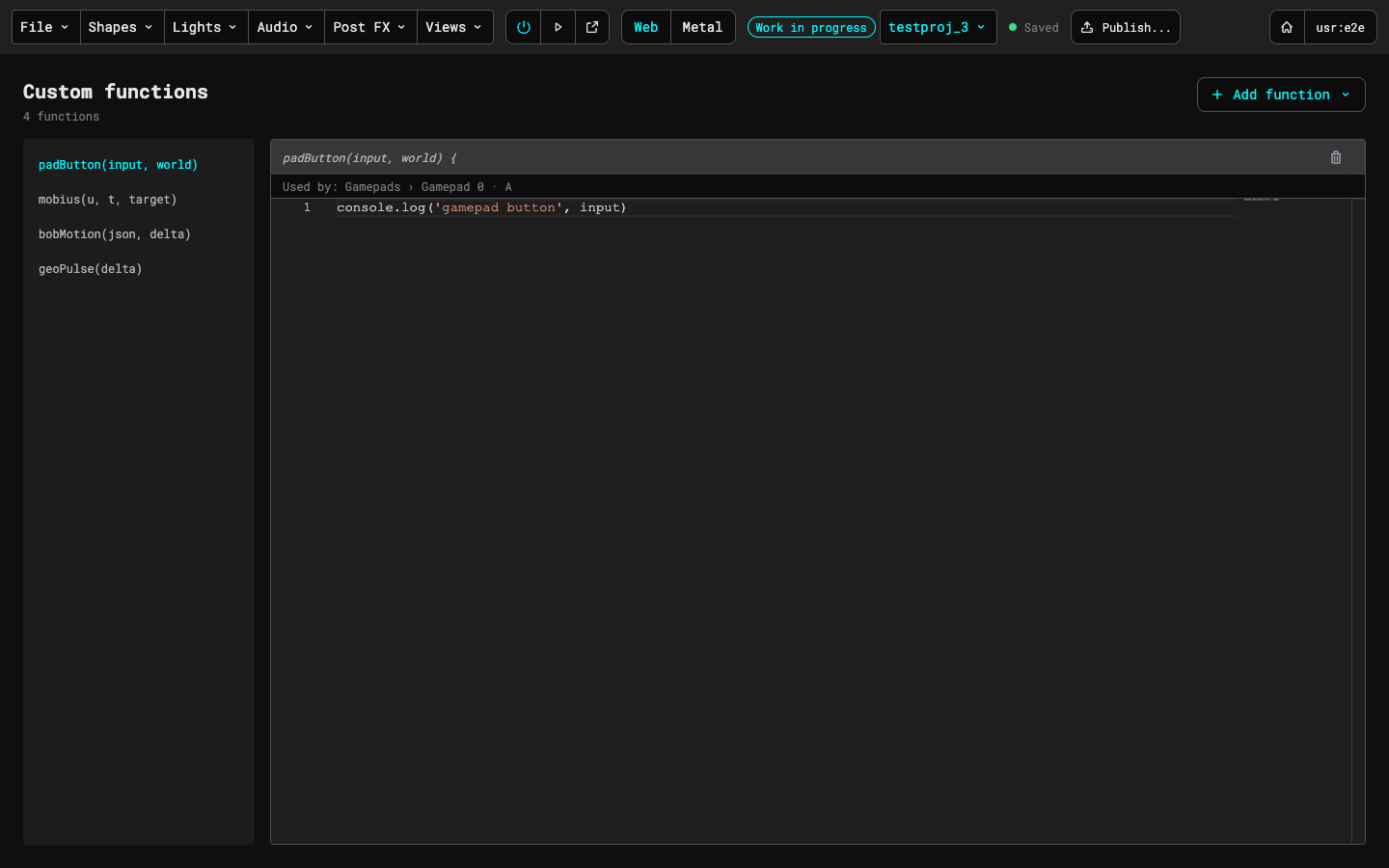
Custom code for the open version. The list on the left shows each function's name and arguments. Pick one to edit its code in the editor on the right; a line under its title says where it's used (for example, a gamepad button). The trash button removes it. Add function creates a new one: pick Create..., then give it a name and a type, or start from the klein, mobius or mobius3D presets.
The types are ctrl (a control function, called by a gamepad button or a BCR2000 dial), para (a surface for a Parametric mesh), mesh (a function that moves a mesh) and geo (a function that changes a geometry).
Gamepads
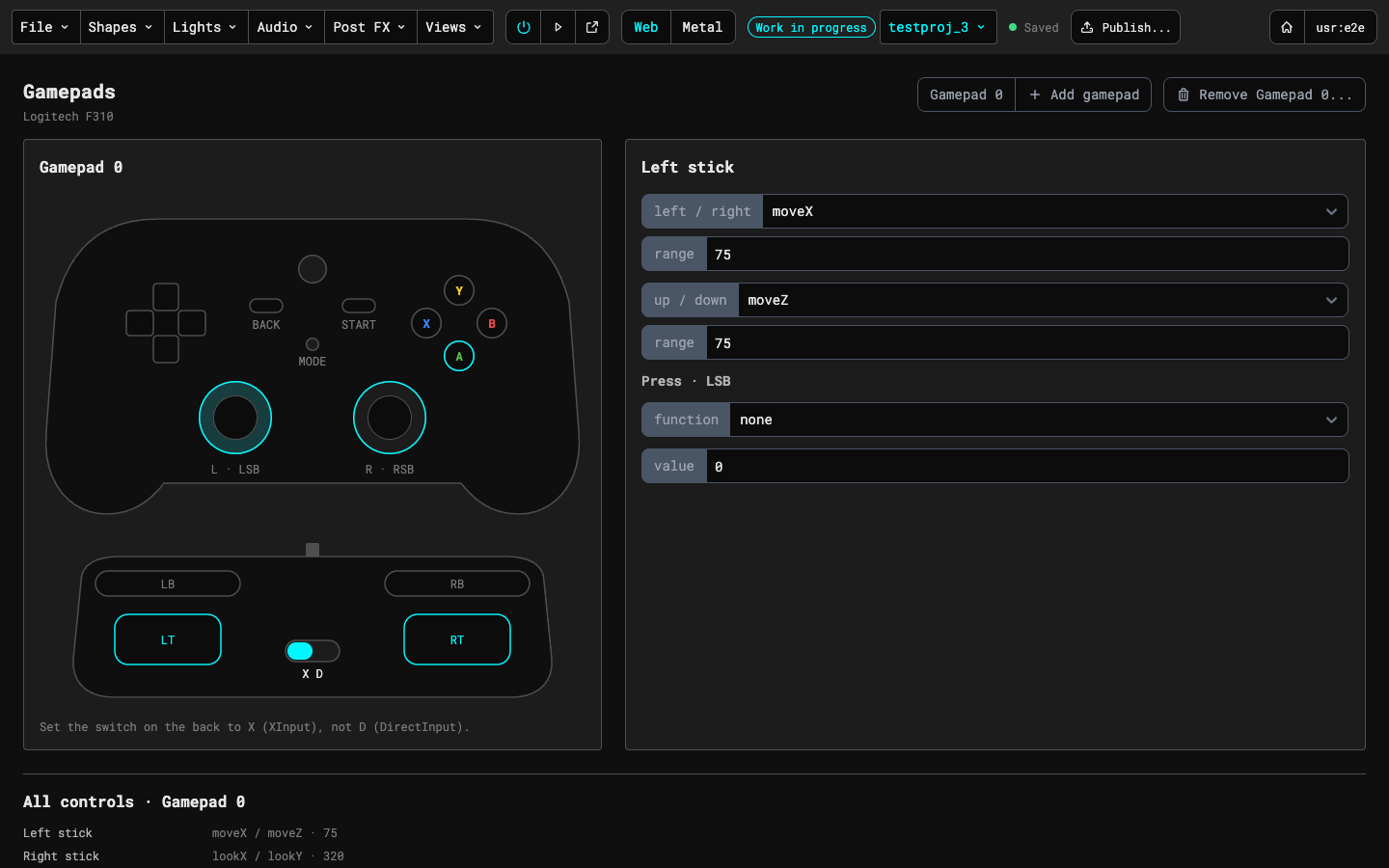
Sets up Logitech F310 gamepads. Set the switch on the back of the pad to X, not D. Click a stick, trigger or button on the picture of the pad, then set what it does in the panel on the right. A stick takes an action and a range for each direction; pressing a stick or a button can call a function with a value. The buttons at the top right switch between pads (Gamepad 0, 1 and so on), add another pad and remove the open one. The list at the bottom shows every control of the pad at a glance.
BCR2000
Maps the controls of one or more Behringer BCR2000s (or BCR32s) for the open version. The heading counts the dials and controllers. Next to it, Save knob positions as start values (⌥⇧S on a Mac, Alt+Shift+S on Windows) takes the knobs' positions as the version's start values, as an unsaved edit until you save the version, and Recall start values (⌥R, Alt+R) sends them back to the knobs. A dot beside them says which runner is listening: Preview open, Runner window open, or no runner open, in which case Recall is off until you start the preview or open it in a new window. Sync from BCR, a row of the gear menu, asks the BCR for its own preset (it needs the runner open and a BCR connected). The gear button (the cog) opens a menu in the style of GitHub's View menu, with a row for MIDI ports, Controllers and Remove BCR2000 mapping, each with its current value and a chevron; a row opens its own dialog. Remove BCR2000 mapping asks first and then removes everything.
Controllers. The Controllers row of the gear menu (its value is the number of controllers) opens a dialog with a row for each controller: its name, a MIDI channel and a model (BCR2000 or BCR32). Set the same channel in the BCR's own preset. A change applies as you make it, as an unsaved edit of the version; a channel another controller uses is refused under its row. Add controller adds another on the lowest free channel, and Remove asks first and says how many dials and buttons move to the first controller and how many buttons are dropped. Done closes the dialog. Every controller has its own grid below, side by side; with three or more the row scrolls sideways.
Other controllers, MIDI learn and profiles. A controller reads either the BCR's 14-bit pairs (input "BCR (14-bit pairs)", the default) or plain 7-bit messages ("Plain 7-bit CC"): every CC 0 to 127 is one complete message, a button is any note or any CC you gave it, and a dial on it can use CC 0 to 127 (a BCR's stay 0 to 31). The Controllers dialog sets the input and, for a 7-bit controller, the port: part of the name of the MIDI output (any case) that its start values are sent to as one CC per dial; leave it empty and nothing is sent. Each controller needs its own MIDI channel.
The gear menu's MIDI learn row (it needs the preview or a runner window open, and Build mode) opens a dialog. Move a control on your controller and the dialog shows what it heard ("CC 77 · channel 9 · Test Controller Port 1"); move another and it replaces it. Click a parameter in the list and the control is linked: a channel no controller has gets a new 7-bit controller named from the port, and the control becomes a target dial with that parameter's range. A note, or a CC with "This is a button" ticked, shows the button actions instead (Next scene, Previous scene, Recall start values, Record performance) and takes the lowest free key, control 1 to 64. The dialog says what a link replaces, and stays open for the next one. If a CC arrives on a BCR channel and no knob turn follows within 150 ms, the dialog offers to switch that controller to plain 7-bit CC. A 7-bit controller's grid shows only its own dials and buttons, in rows of 8, with each dial's CC and channel.
The Controller profiles row opens a dialog with the profiles the editor ships (the BCR2000) and the ones saved for everyone in your group. A profile describes a device: its name, maker, port and units (name, channel, model, input, and its labelled dials and buttons), never what a control is linked to. Apply copies the profile's units into the scene as controllers and is refused, changing nothing, if a channel is already used; a scene that is still the untouched default BCR is replaced instead. Export downloads the profile as JSON, Import reads a file (refused with the reason when it is too large, not JSON or not a profile) under a name you can change, and Save as profile makes one from a controller of the scene. Deleting a profile never changes a scene.
MIDI ports. Normally the editor finds a BCR by the word BCR in the name of its MIDI port. When a BCR is connected through a MIDI interface, its ports have the interface's names (for example "MIDIFlex4 Port 3"), so nothing is found. The MIDI ports row of the gear menu (its value reads "auto", or how many inputs and outputs you chose, like "2 in, 2 out") opens a dialog that lists every MIDI input and output the runner sees; the row is off until a runner (the preview or its own window) is open. Tick the outputs the BCR is connected to (start values, the LED rings and Sync from BCR's preset read are sent there) and the inputs it comes in on (the preset read listens there, and the status counts them), then press Done. Knobs and buttons are still read from every input. With nothing ticked, ports named BCR are used as before. The choice is kept in this browser. If the dialog says the runner hasn't reported its ports, reload the runner window. Two units on one setup still need different MIDI channels in their presets, because start values go to every ticked output.
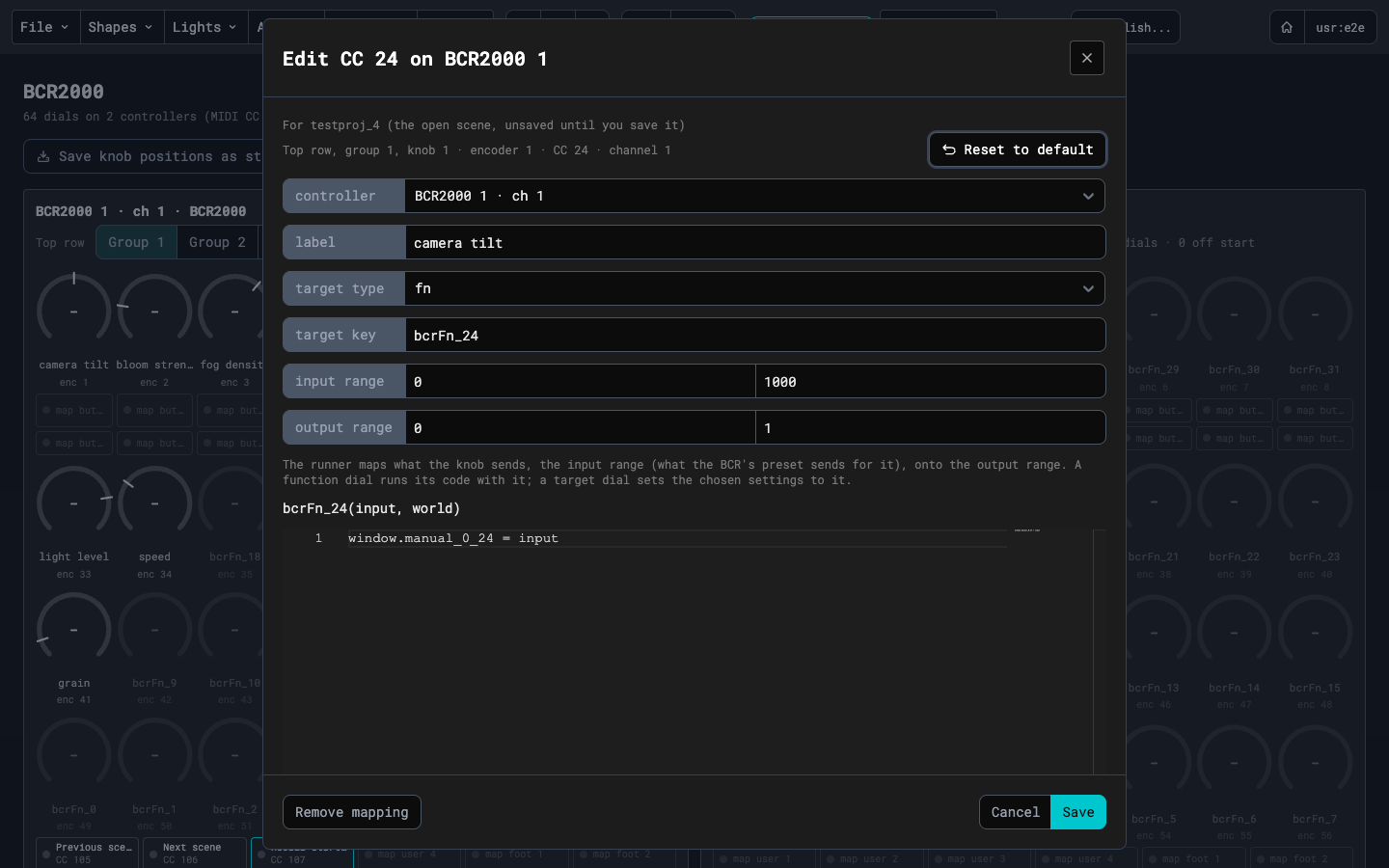
Dials. A controller has 32 dials (MIDI controls 0 to 31). The grid is the same one the manual show uses. Each dial shows the knob's live value large in a ring, its label under it, and a small encoder number (enc 1 to 56) under that. The encoder number follows the usual BCR layout, so it matches the unit only when the preset does. The dial doesn't show its CC or NRPN: hover it to read where it is and what it sends. Click a dial to open its dialog, the same one the sequence page uses. The line at the top of the dialog says the same, for example "Top row, group 4, knob 1 · encoder 25 · NRPN 25 · channel 1". A dial shows an arc for its live value as soon as its knob moves, in grey until the dial is mapped, and an unmapped dial has no start tick. The dialog sets what the dial controls: the controller it is on (with two or more controllers, saving moves the dial with its function and start value), a target (an element chosen by its key, see Target dials below), a label, an input range and an output range, the NRPN number for groups 2 to 4, and a function that runs with the dial's value. Reset to default puts the defaults into the form, and nothing changes until you press Save; Cancel or Esc closes the dialog without changing anything, and Remove mapping clears the dial. On this page Save is an unsaved edit of the open version, like the other changes here. A dial's start value isn't in the dialog: use Save knob positions as start values for all of them at once. A dial with settings is lit. With a runner open, a mapped dial shows the knob's live value as an arc and its start value as a white tick, and turns amber while the knob is off its start value. The input range is what the dial sends: 0 to 1000 for the usual 14-bit knob, so a value of 500 is halfway.
Target dials. A dial whose type is target drives numbers in the scene without a function. Choose the Target key (an element, or Camera, Fog, Renderer, Tempo, or a post-processing pass of the scene) and the Settings select under it lists what that target offers: for an element its position, rotation and scale, its material's or light's own settings (opacity, roughness, intensity and so on) and the numbers of its animations (a rotate's speeds, an ellipse's radii and speed; a collider also offers the base numbers of its per-instance animations, not their random ranges); for the camera its lens (field of view, zoom, near, far, focus) and the numbers of its camera motions (an orbit's radii and speeds, a focus sweep's swing, rate and phase); for the fog, the renderer and a post pass their own numbers; an element whose video flip is on offers Flip rate (ms, 30 to 10000) and Crossfade % (0 to 100); an element with a keyed video texture offers Key threshold (0 to 1) and Key softness (0 to 0.5), which apply to every keyed texture of its material; and the Tempo target offers BPM (20 to 300). A rate dial on an element that is synced to the tempo changes the saved rate with no visible effect until the element is set to free. You can choose several settings, and a turn of the knob sets all of them to the same value. One dial has one output range, so the Settings select only lets you pick settings with the same range: choose Scale x and Scale y and z stay available, but a setting that runs from 0 to 1 is greyed out with its range beside it, and clearing your choices frees them all again. The first setting you choose fills the output range from that setting's limits (a light's intensity, which has no top, runs from 0 to twice its current value); you can edit the range afterwards. A target dial needs an element and at least one setting before it can be saved. The runner sets the settings as the knob turns and, like a function dial, applies the dial's start value when a scene loads and on Recall. If the element isn't in the scene, or the setting isn't there (for example fog in a scene without fog), the dial does nothing and the runner's overlay says so once. The animations change while they run, not in the saved scene: when the scene reloads they start from their saved numbers again. The camera spin's turn speed is in degrees.
Shader uniforms and time on a target dial. An element whose material is a shader (a mesh, an OBJ or an instance geometry) also offers the shader's uniforms in the Settings select: one "Uniform <name>" for each float, int or bool the vertex and fragment shaders declare, and one per part of a vector ("Uniform color x", y, z, w). Matrices, arrays, textures and the runner's own time, resolution and tex0, tex1… are not listed. A uniform's range is the one the Uniforms tab of the shader shows: its min and max, else the numbers in the shader's comment (uniform float xB; // 0 5), else 0 to twice its current value (0 to 1 when that is 0); the parts of a colour and a bool run 0 to 1, and an int moves in whole steps. Because the range is the same, the red, green and blue of a colour (or three separate red, green and blue floats with the same range) can be chosen together and one dial sets all of them. A uniform that the Uniforms JSON lacks is listed too, and starts at 0. An int is rounded, and a bool is on when the dial's value is above the middle of its output range. "Time rate" and "Time offset" drive the shader's clock: the rate scales how fast time runs (0 to twice the saved rate, or its min and max), changing it while the scene runs doesn't make the animation jump, and the offset (0 to 10, or the min and max of the Time offset row) is added to time and replaces the saved offset while the scene runs. Neither is saved in the scene; when it reloads the saved rate and offset apply again.
OBJs and instance geometries also offer their material's own numbers (opacity and the rest for the material type) like a mesh does, so a dial can fade them.
Sync from BCR. The gear menu's Sync from BCR row opens a dialog that reads the BCR's preset as soon as it opens (a real unit takes 10 to 15 seconds, so it says Reading...) and then shows one review: the presets found, the input ranges that differ from the dials' (for example "CC 7: preset sends 0–16383, scene says 0–1000"), the NRPN numbers of groups 2 to 4 that differ ("group 2 knob 1 (CC 24): NRPN 9 to 100"), the encoders in groups 2 to 4 that don't send NRPN, and what the editor can't use (7-bit and relative encoders, a controller the preset has nothing for). Apply sets the ranges and the numbers together, as an unsaved edit of the version here and as a saved change to the playing scene on the sequence page; Cancel changes nothing. If the preset agrees with the dials, the review says so and Apply is off. If the BCR doesn't answer, SysEx is blocked or no runner is open, the dialog says why, with Retry.
Groups. The push-encoder row (CC 24 to 31) has four groups, the BCR's four banks. Group 1 sends the normal control change; groups 2 to 4 send NRPN, so each of those dials has an NRPN number that has to match the number in the BCR's preset. A new dial starts with its encoder number (encoder 25 sends NRPN 25), so a preset that follows that convention needs no sync; dials already saved keep their numbers. The Group 1 to 4 tabs in each controller's grid switch which group its top row shows, and a group with dials in it is marked. The tabs follow the knobs too, since the BCR's group keys send no MIDI: turn a top-row knob of another group and the tab and the top row move to that group (a click on a tab holds until the next such turn). The numbers are an unsaved edit until you save the version.
Buttons. Click a button to open its dialog. Buttons 1 to 16, the user keys and the two footswitches map the same way as on the sequence page, with Learn to fill in the number from a press of the button: a CC (64 to 127) or a note, momentary or toggle, and an action (run a function, previous or next scene, recall the start values). CC 98 and 99 can't be used for a button, since the runner reads those as the start of an NRPN message.